
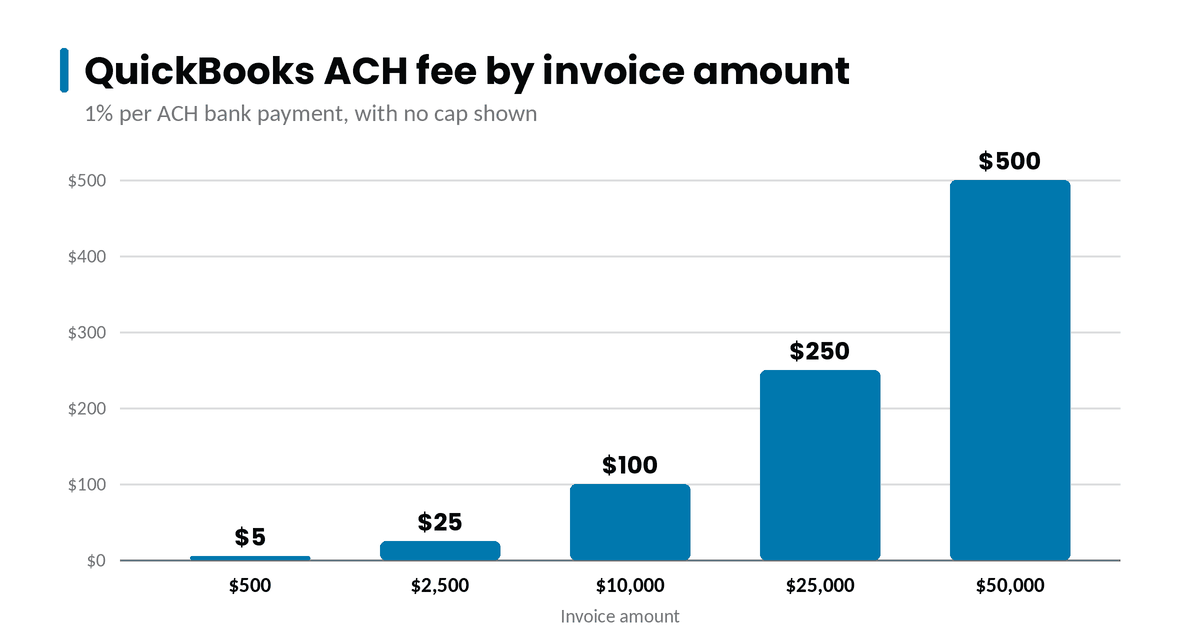
QuickBooks charges 1% for each automated clearing house (ACH) bank payment a customer makes through QuickBooks Payments. Intuit’s rates page, accurate as of September 18, 2026, shows no cap for those QuickBooks ACH fees (Intuit). On a $10,000 invoice, you pay $100.
This guide covers what QuickBooks charges for ACH, how the old fee cap changed, and your options for lowering what you pay.
How Much Are QuickBooks ACH Fees?
QuickBooks Payments charges 1% of the payment amount for each ACH bank payment. The same rate applies to QuickBooks Desktop Payments, on both the pay-as-you-go and monthly plans (Intuit). Intuit’s pricing terms say fees are rounded to the nearest cent (Intuit pricing schedule).
The rate also applies when a connected app runs payments through QuickBooks Payments. Intuit’s terms say ACH payments processed by third-party apps that use the QuickBooks Payments API are subject to the ACH rate.
Because the fee is a percentage, it grows with the invoice. A $500 invoice costs you $5, and a $50,000 invoice costs $500. A business that collects $10,000 a month by ACH pays $1,200 a year in ACH fees.
Is There a Cap on QuickBooks ACH Fees?
Accounts opened since September 2023 pay 1% with no cap. A QuickBooks team reply in October 2025 said accounts opened on or after September 6, 2023, follow the no-cap plan (QuickBooks Community). Intuit’s pricing terms use September 12, 2023, as the cutoff for legacy customers.
Some older accounts still have a capped ACH fee, and Intuit’s published terms list different caps by account type. If your account predates September 2023, check the fee schedule in your QuickBooks account, or a recent statement, before you compare options.
A Worked Example
Take a business that sends 40 invoices a month, averaging $5,000 each, and collects them all by ACH through QuickBooks Payments.
- Monthly ACH volume: $200,000.
- QuickBooks ACH fees at 1%: $2,000 a month, or $24,000 a year.
- With the customer-paid option on every invoice: each customer pays $25, and the business pays no ACH fee on those invoices.
- With Instant Deposit on every payment: another 1.75%, or $3,500 a month.
Invoice size changes the picture. Spread the same $200,000 over 400 invoices of $500, and you still pay $2,000 a month at 1%. A $25 customer fee would then cost each customer 5% of the invoice.
What Else Affects What You Pay?
- Deposit timing. QuickBooks deposits most ACH payments on the next business day when you process them before 3 p.m. PT. A new account’s first batch can take up to 5 business days (Intuit).
- Instant Deposit. Moving funds to your bank account in up to 30 minutes costs 1.75% of the amount you deposit (Intuit).
- Volume. Intuit says businesses that process over $2,500 a month could qualify for up to 25% off transaction costs.
How Can You Lower QuickBooks ACH Fees?
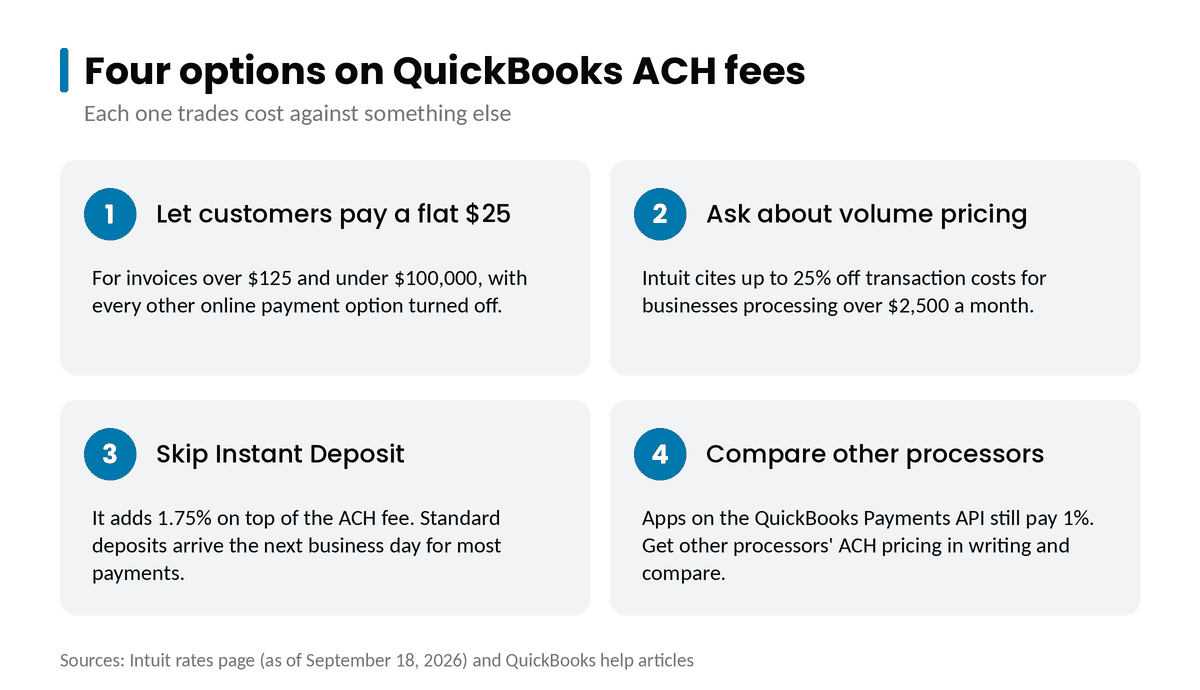
You have four options. Each one trades cost against something else, so run the numbers at your usual invoice sizes.
1. Let Customers Pay a Flat Fee
QuickBooks can charge your customer a flat $25 convenience fee to pay an invoice by ACH, so you don’t pay the 1% (Intuit). The option comes with conditions:
- The invoice must be more than $125 and less than $100,000.
- Every online payment option on the invoice must be turned off, with “Your customer pays the fee” turned on.
- Customers can’t pay part of an invoice by ACH.
- If any payment option is on, you pay the fee instead of your customer.
A flat $25 costs your customer more than 1% would on invoices under $2,500, and less on larger ones. Tell customers about the fee before you send the first invoice.
2. Ask About Volume Pricing
If you process more than $2,500 a month, ask Intuit whether its volume discount applies to your ACH payments. The rates page describes it as a discount on transaction costs without naming payment types.
3. Skip Instant Deposit When You Can Wait
At 1.75%, Instant Deposit costs more than the ACH fee itself. Next-business-day deposit is the standard for most ACH payments.
4. Compare Other Processors’ ACH Pricing
QuickBooks Online connects with over 800 business apps (Intuit), and you can record invoice payments received outside QuickBooks Payments (Intuit). An app that runs payments on the QuickBooks Payments API still pays Intuit’s ACH rate. If an app sends payments through a different processor, ask for that processor’s ACH pricing in writing. Compare it with 1% at your typical invoice sizes, including any monthly or per-payment fees.
How Do Partner Integrations Work With QuickBooks?
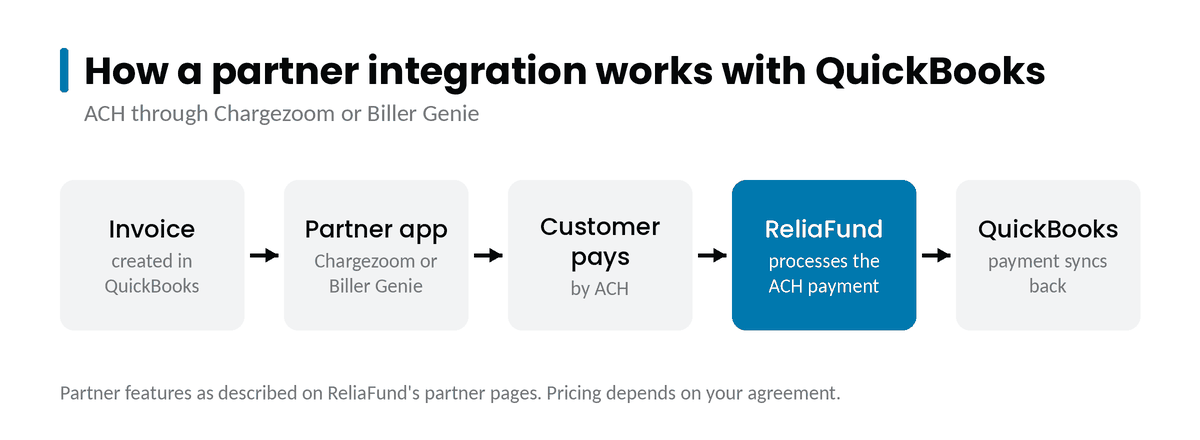
ReliaFund’s ACH processing is available to QuickBooks users through two partners (ReliaFund partners):
- Chargezoom is an integrated payments solution. Its payment integrations include QuickBooks, and it syncs with both QuickBooks Desktop and QuickBooks Online. Its branded customer portals handle invoices, recurring billing, and payment of several invoices in one click.
- Biller Genie integrates with QuickBooks. Your customers can pay invoices by credit card or ACH, and Biller Genie reconciles the payments in your accounting software.
For timing on the ACH side, see how long an ACH transfer takes.
What to Do Next
- Add up last quarter’s ACH fees from your QuickBooks Payments statements.
- Check your account’s start date. An account that predates September 2023 may still have a capped ACH fee.
- Sort invoices by size. The larger your invoices, the more a 1% fee costs you.
- Decide whether a $25 customer-paid fee fits your invoices over $2,500.
- Turn off Instant Deposit where next-day funding works.
- Get ACH pricing in writing from any integration you’re considering, and compare it at your invoice sizes.
How ReliaFund Helps
ReliaFund has processed payments since 2001, and ACH processing is our primary focus. QuickBooks users can reach our ACH processing through our partners Chargezoom and Biller Genie. Reporting goes down to the transaction level and shows each ACH payment’s status from pending to funded to settled.
We offer a 30-day account with no long-term contracts. When you call 1-866-243-5040, a team member answers and directs your call.
Get a free payments review. Call 1-866-243-5040.
Frequently Asked Questions
How much does QuickBooks charge for ACH payments? QuickBooks Payments charges 1% of each ACH bank payment. Intuit’s rates page, accurate as of September 18, 2026, shows no cap.
Is there a cap on QuickBooks ACH fees? Not for accounts opened since September 2023. Some older accounts still have a cap, so check the fee schedule in your account.
Can my customer pay the ACH fee? Yes. QuickBooks can charge the customer a flat $25 on invoices over $125 and under $100,000. Every online payment option on the invoice must be off.
How long do QuickBooks ACH payments take to deposit? Most arrive the next business day when processed before 3 p.m. PT. A new account’s first batch can take up to 5 business days.
Can I use a different ACH processor with QuickBooks? Yes. QuickBooks Online connects with outside apps, and you can record payments received outside QuickBooks Payments. Apps built on the QuickBooks Payments API still pay Intuit’s ACH rate.
Intuit’s rates and terms are quoted as published on the dates shown. Check Intuit’s current pricing before you decide.
Sources
- Intuit: QuickBooks Payments rates (accurate as of September 18, 2026) and QuickBooks Desktop Payments
- Intuit: Standard pricing schedule (last updated September 12, 2023)
- Intuit: Let customers pay invoices by ACH with a convenience fee (updated August 11, 2026)
- Intuit: Find your QuickBooks Payments deposits (updated August 5, 2026)
- Intuit: QuickBooks integrations and Record invoice payments in QuickBooks Online
- QuickBooks Community: QuickBooks team reply on ACH fee caps (October 15, 2025)