
Remote deposit capture (RDC) lets you scan checks where you receive them and deposit the images electronically, without a trip to the bank. Check-cashing stores and other businesses can often use it. But the bank or processor must approve you first, and approval depends on the controls you can show. This checklist covers the equipment, daily routine, and records RDC takes.
Checks still matter for many kinds of businesses. The Federal Reserve processed nearly 3 billion commercial checks in 2024. The Financial Crimes Enforcement Network (FinCEN) received 15,417 reports of mail-theft check fraud involving more than $688 million in six months of 2023 (Consumer Compliance Outlook, 2025). Good RDC controls speed up your deposits and cut that risk.
What Is Remote Deposit Capture?
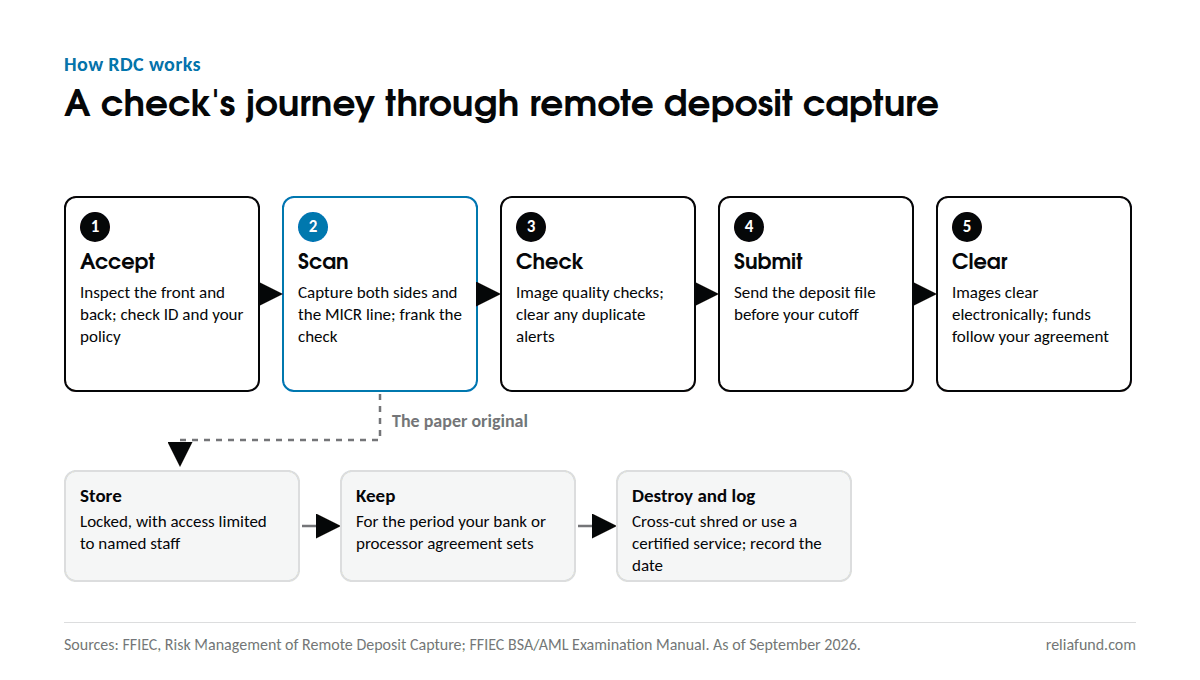
RDC is a way to deposit checks as images. A desktop scanner captures the front and back of each check and reads the magnetic ink character recognition (MICR) line along the bottom. Software checks each image, and you send the deposit to your bank or processor as a file. The checks then clear electronically.
The Check Clearing for the 21st Century Act (Check 21), effective October 28, 2004, made electronic check clearing practical. It made a substitute check printed from an image the legal equivalent of the original (Federal Reserve). Today banks exchange check images under agreements with each other.
For a business, RDC changes three things. Deposits go in the same day you take the checks, before your bank’s cutoff. Nobody carries paper checks to a branch. And you become responsible for the paper originals until you destroy them.
Can a Check Casher Use Remote Deposit Capture?
Often, yes, but approval isn’t automatic. Banks and processors decide who may use RDC, and they look closely at money services businesses (MSBs). The Federal Financial Institutions Examination Council (FFIEC) guidance on RDC asks banks to set risk-based standards for qualifying customers. Banks review your business, location, and customer base, and may visit your site (FFIEC guidance, 2009).
Banks have reasons to be careful. The same guidance notes that altered or counterfeit items can be harder to catch from images. It also calls for added due diligence when a scanner may be in a foreign location (FFIEC guidance).
Regulators don’t treat every MSB as high risk. Interagency guidance from 2005 says banks should confirm an MSB’s FinCEN registration and state licensing, then add scrutiny where the risk calls for it (FinCEN). The same guidance treats cashing payroll or government checks as lower risk than cashing third-party or out-of-state checks.
Under FinCEN’s rules, you’re a check casher if you cash more than $1,000 in checks for any person on any day (31 CFR 1010.100). Check cashers register with FinCEN and renew every two years (FinCEN). Our primer on money services businesses covers the basics.
Expect your bank or processor to ask for:
- Your FinCEN registration and state license
- Your anti-money laundering (AML) program and check-cashing policies
- Your expected monthly check volume, typical and largest check amounts, and the check types you cash
- Where each scanner will sit and who will use it
No processor can promise approval in advance. What you control is how complete and organized that file is.
What Scanner Does a Check-Cashing Store Need?
A single-feed scanner that reads the MICR line, images both sides, and franks each check is the usual fit for a counter. A multi-feed scanner suits a back office that deposits checks in batches. Either way, choose a model your bank or processor supports, because the scanner must work with its RDC software.
| Feature | Why it matters | What to ask |
|---|---|---|
| Single-feed or multi-feed | Single-feed handles one check at a time at a counter; multi-feed handles stacks in a back office | How many checks does each location scan on a busy day? |
| MICR reading | Captures the routing, account, and check numbers for the deposit record | Does it read the MICR line in the same pass as the image? |
| Front and back imaging | Your bank needs both sides, including the endorsement | Does it meet the bank’s image quality checks? |
| Franking or endorsement printing | Marks each check as processed so it isn’t deposited again | Is an inkjet endorser built in or an add-on? |
| Software compatibility | The scanner must work with your bank’s or processor’s RDC system | Which models are approved? |
| Security | The scanner and its computer handle account data | Does the software support individual logins and multi-factor authentication? |
Image quality matters more than speed. Check images move between banks in formats set by the Accredited Standards Committee X9. The Federal Reserve Banks run quality checks on the images they process (Federal Reserve Financial Services). Your bank or processor sets its own image standards, so ask what they are.
How Do You Prevent Duplicate Deposits?
Mark every check as processed the moment you scan it. Look at the back of every check before you accept it, and keep originals locked until your agreement lets you destroy them. The FFIEC calls duplicate presentment both a business-process risk and a fraud risk (FFIEC guidance).
For a check casher, one common route to a duplicate starts outside your store. A customer deposits a check with a phone app, then cashes the same paper check at your counter. When you deposit it, the paying bank sees the check a second time and returns it.
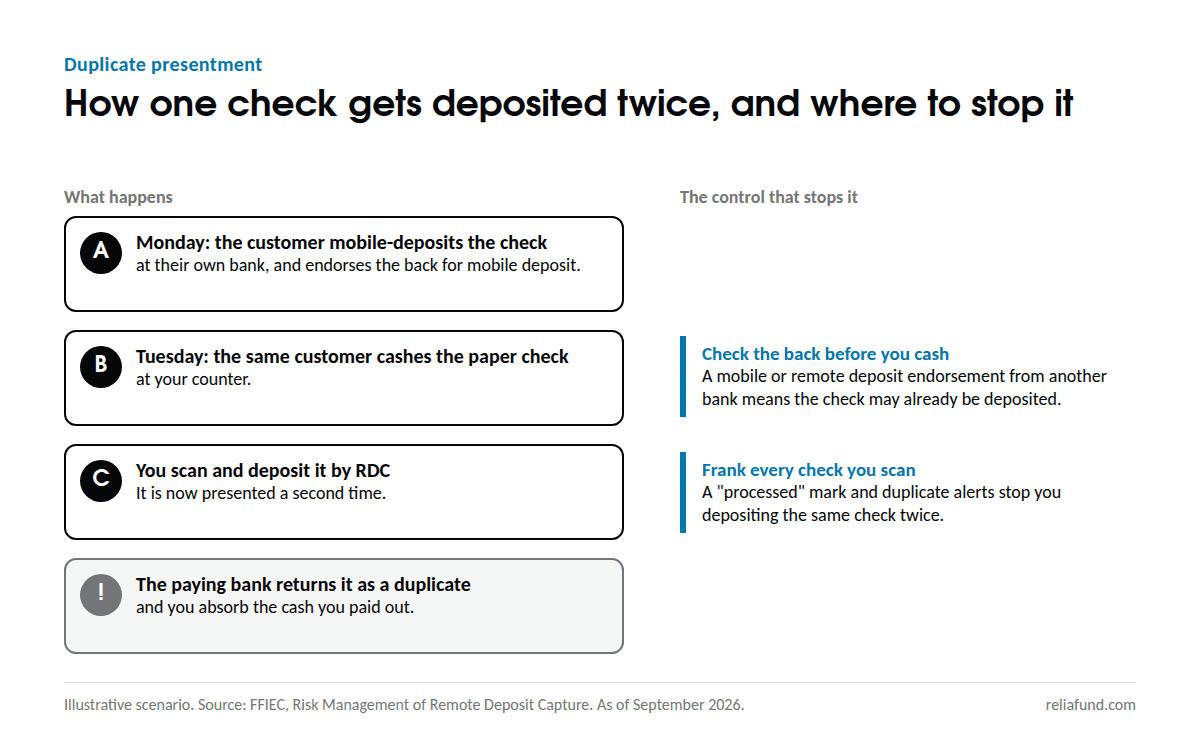
Federal rules shape who bears that loss between banks. Since July 1, 2018, a bank that accepts a check by RDC can owe another bank that later accepts the paper original. That claim fails if the original carried a restrictive endorsement inconsistent with how it was deposited, such as “For mobile deposit only” (12 CFR 229.34(f)).
That protection runs between banks, and only to a bank that takes the paper original. When you deposit a duplicate by RDC, the return is typically charged back to your account. A clear restrictive endorsement on your own RDC deposits matters. And a check with another bank’s mobile-deposit endorsement on the back may already have been deposited, so treat it with caution under your policy.
Build these controls into every day:
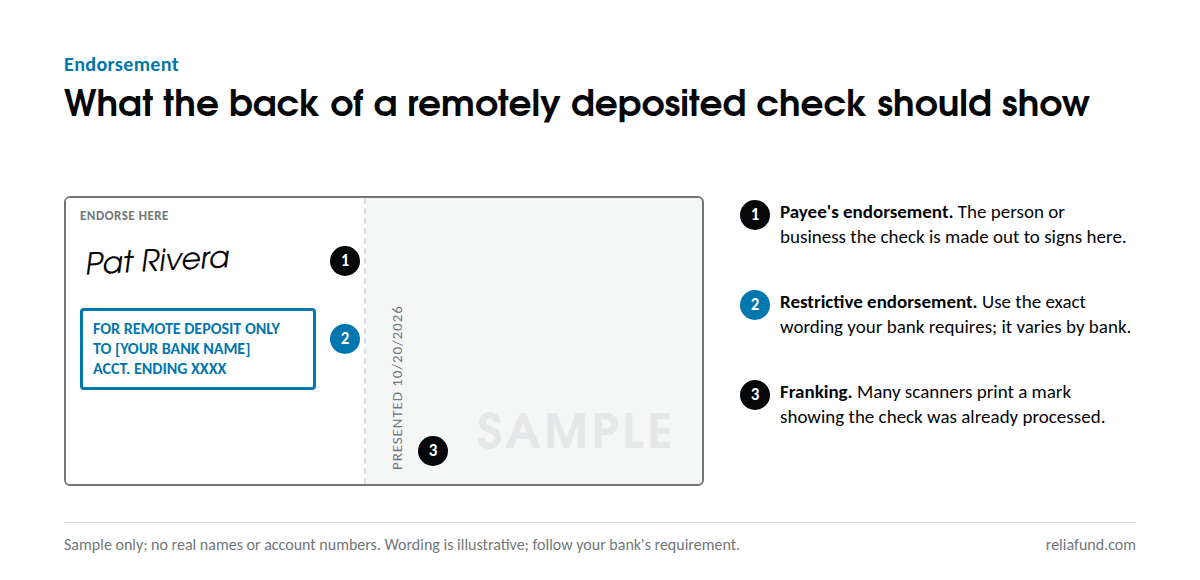
- Frank or endorse each check as you scan it. Many scanners can print a “processed” mark.
- Use your bank’s restrictive endorsement wording exactly. Many banks require one, and the wording varies by bank.
- Check the back of every check you accept for another bank’s mobile or remote deposit endorsement.
- Turn on duplicate detection in your RDC software, and never rescan a check without checking your deposit history.
- Reconcile each day’s deposits to your bank or processor report.
Is Remote Deposit Capture Safe?
RDC’s risks can be managed with the controls banks expect, and the interagency guidance says what those are. They include customer due diligence, a written agreement, information security, image quality, careful handling of originals, and AML monitoring (FFIEC guidance).
Two expectations affect your setup directly. First, the guidance treats a password alone as inadequate for higher-risk transactions, so expect multi-factor authentication on your RDC login. Second, your agreement will set how you store, keep, and destroy original checks.
Check fraud is the other side of safety. Washed, altered, and counterfeit checks are the risks to screen for at the counter. Our tips for preventing and recognizing check fraud cover what to look for before you cash.
The Remote Deposit Capture Setup Checklist
Work through these items before your first deposit, then keep the daily and compliance items as standing routines.
Before you apply
- ☐ FinCEN registration current and state license on hand
- ☐ AML program and check-cashing policy up to date
- ☐ Monthly check volume, typical and largest amounts, and check types written down
- ☐ Each location and each person who will scan listed
Equipment and access
- ☐ A scanner your bank or processor supports, at each location
- ☐ A dedicated, updated computer for RDC
- ☐ Individual logins with multi-factor authentication, and no shared passwords
- ☐ Separate rights to scan and to submit deposits, where staffing allows
Every business day
- ☐ Inspect each check, front and back, before you accept it
- ☐ Endorse and frank each check as you scan it
- ☐ Review every image for quality before you submit
- ☐ Clear any duplicate alerts before you submit
- ☐ Submit before your bank’s or processor’s cutoff
- ☐ Reconcile the day’s deposit total to the confirmation report
Original checks
- ☐ Store scanned checks in a locked place with access limited to named staff
- ☐ Keep them for the period your bank or processor agreement sets
- ☐ Destroy them by cross-cut shredding or a certified service, and log the date
Compliance
- ☐ File a Currency Transaction Report (CTR) when cash in, or cash out, by or for one person exceeds $10,000 in a business day (31 CFR 1010.311 and 1010.313)
- ☐ Check whether FinCEN’s southwest border geographic targeting order covers your ZIP code. It requires CTRs for cash transactions between $1,000 and $10,000 in parts of Texas and New Mexico (FinCEN, September 2026).
- ☐ Apply your policy on third-party and out-of-state checks
- ☐ Train staff each year, and update this checklist when your bank’s terms change
What to Do Next
- Gather your documents in one folder: registration, license, AML program, and check-cashing policies.
- Count a typical month of checks: how many, the average amount, and the largest.
- Ask your bank or processor which scanners it supports and what endorsement wording it requires.
- Pilot RDC at one location for a month before you roll it out to others.
How ReliaFund Helps
ReliaFund has processed payments since 2001, and check processing is one of our core services. Our check processing for money services businesses includes remote deposit capture, with fewer trips to the bank. Compliance support is built into our MSB offering, and reporting goes down to the transaction level.
We also offer ACH processing and funds disbursement. When you call 1-866-243-5040, a team member answers and directs your call.
Frequently Asked Questions
Is a scanned check image a substitute check? No. A substitute check is a paper copy printed from an image, with a required legend. Check 21 makes it the legal equivalent of the original. RDC images move between banks electronically under their agreements.
How long should I keep the original check after scanning? Keep it for the period your bank or processor agreement sets. Federal guidance leaves the period to the agreement, so check yours. Store originals locked, then shred them and log the date.
Can I deposit third-party or out-of-state checks by RDC? It depends on your bank’s or processor’s policy. Regulators’ 2005 guidance treats third-party and out-of-state checks as higher risk than payroll or government checks, so expect closer review.
Do I need a restrictive endorsement? Many banks require one for remote deposits, and the exact wording varies. Use the wording in your agreement on every check.
What happens if a check I deposited by RDC is returned? The returned amount is charged back to your account, just as it would be for a paper deposit. Follow your returned-check process, and look for patterns in the checks that come back.
This article is general information. It isn’t legal or compliance advice. Confirm your obligations with your bank and legal counsel.
Sources
- FFIEC: Risk Management of Remote Deposit Capture (January 14, 2009, as published by the FDIC)
- eCFR: 12 CFR 229.34, warranties and indemnities, including remotely deposited checks
- Federal Reserve: Check 21 frequently asked questions
- Federal Reserve Financial Services: Electronic check processing technical information
- FinCEN: Interagency guidance on providing banking services to MSBs (April 26, 2005), MSB registration, and Southwest border geographic targeting order (September 2, 2026)
- eCFR: 31 CFR 1010.100, definitions, 31 CFR 1010.311, currency transaction reports, and 31 CFR 1010.313, aggregation
- Consumer Compliance Outlook: Responding to counterfeit instrument scams and mail-related check fraud (2025)